
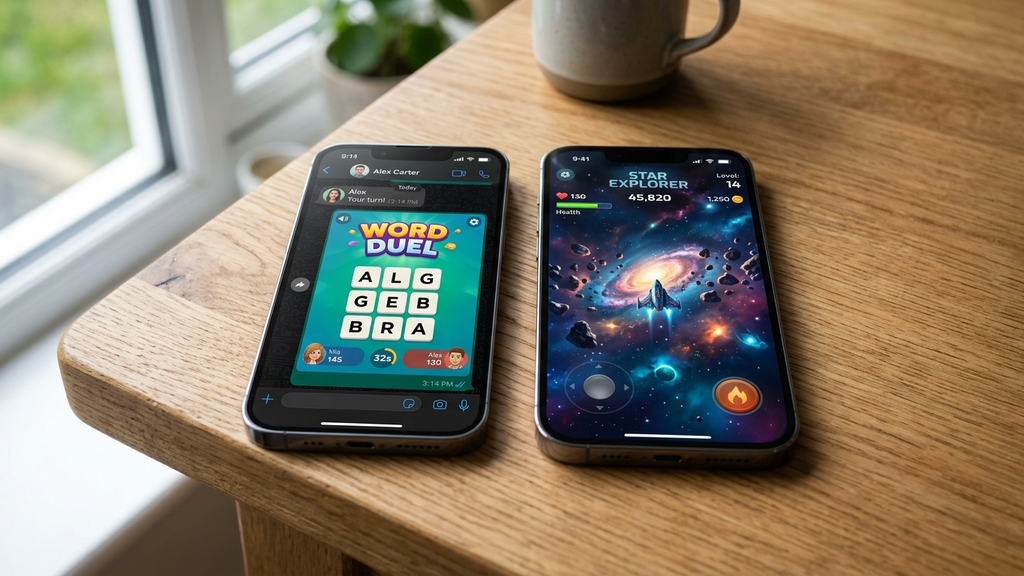
Comparing Facebook Instant Games vs mobile web apps in 2026 reveals two completely different visions for the future of zero-install mobile entertainment. Both technologies promise to liberate players from crowded app stores and lengthy downloads, but their underlying architectures create very different gaming experiences.
On one side stands Facebook Instant Games, embedded deeply within Messenger threads and built around social viral loops. On the other side are modern Mobile Web Apps and Progressive Web Apps (PWAs), running independently in mobile browsers with full hardware acceleration, custom UI scaling, and zero platform lock-in.
Quick Picks: Key Comparison Highlights
Here is the quick breakdown of how Facebook Instant Games and standalone Mobile Web Apps compare across major performance and usability categories:
- Social Friction: Facebook Instant Games wins by embedding scoreboards and turns directly inside your active chat threads.
- Loading Speed: Mobile Web Apps win with lean codebases that avoid Facebook’s heavy SDK handshakes and tracking scripts.
- Privacy & Permissions: Mobile Web Apps win by running in clean browser sandboxes without requiring account linkage or profile access.
- Offline Capability: Mobile Web Apps (PWAs) win with modern Service Worker caching that allows full play without an active internet connection.
- Turn-Based Longevity: Facebook Instant Games excels for asynchronous games like Words With Friends where chat notifications keep friends accountable.
- Fullscreen Immersion: Mobile Web Apps offer true borderless fullscreen play without messenger header bars or chat overlay bubbles.
- Controller Support: Mobile Web Apps provide standard Gamepad API access for Bluetooth controllers; Instant Games frequently restrict gamepad inputs.
- Monetization Cleanliness: Mobile Web Apps typically feature fewer forced interstitials compared to Facebook’s automated in-stream ad network.
- Cross-Platform Access: Mobile Web Apps run uniformly across Windows, Mac, Linux, Chrome OS, Android, and iOS browsers with zero account restrictions.
- Battery Efficiency: Mobile Web Apps consume less background battery by bypassing Facebook’s continuous background telemetry.
Head-to-Head Scenarios: Which Should You Play?
Depending on whether you prioritize social connection or pure gameplay performance, each platform serves a distinct purpose.
When to Pick Facebook Instant Games
Choose Facebook Instant Games when your primary goal is asynchronous social competition with friends and family who already chat on Messenger. Games like Words With Friends, 8 Ball Pool, and Draw & Guess thrive because everyone already has an account. You never have to explain where to click or convince a non-technical family member to bookmark a URL—they simply tap the game card in your family chat.
When to Pick Standalone Mobile Web Apps
Choose Mobile Web Apps and PWAs when you want fast, responsive, and distraction-free gaming. Because standalone web games don’t load the Meta social graph SDK or video advertising queues, they boot in under two seconds. You get clean edge-to-edge touch controls, smoother 60-FPS rendering, and the freedom to play without broadcasting your activity to an entire contact list.
For Offline Commutes and Flights
Go exclusively with Mobile Web Apps (PWAs). Progressive Web Apps can store their entire asset bundle on your device via Service Workers. When you switch your phone to airplane mode on a flight or lose signal in an underground subway tunnel, a properly cached web app continues running without interruption, whereas Facebook Instant Games will fail to connect.
Platform Comparison FAQ
Do Facebook Instant Games cost money to play?
No. All Facebook Instant Games are free to launch, but they rely heavily on rewarded video advertisements and optional in-app microtransactions for virtual currency and cosmetic upgrades.
Can I install a Mobile Web App to my phone’s home screen?
Yes. When visiting a modern web game in mobile Chrome or Safari, tap the browser menu (or Share button) and select “Add to Home Screen”. The game will install as a Progressive Web App (PWA), launching in a standalone window without browser address bars, looking and feeling identical to a native app.
Which platform is safer for privacy?
Mobile Web Apps running on independent websites offer far greater privacy. They do not access your Facebook profile, friend lists, or real name, and you can play without logging in.
Why do some Facebook Instant Games feel sluggish on older phones?
Instant Games run inside a webview iframe wrapped within the larger Facebook or Messenger application shell. This nested layer consumes substantial RAM, leading to frame drops and sluggish touch latency on entry-level smartphones.
Rovin Games Picks
Experience the speed and clean responsiveness of pure mobile web gaming with our zero-install originals:
- Neon Chuck: Precision neon reflex challenge engineered for instant full-screen mobile web performance.
- Number Puzzle: Minimalist sliding number solver that runs smoothly across all mobile browsers with zero login barriers.
Disclosure: Neon Chuck and Number Puzzle are developed by Rovin Games.
See Also
- Best Facebook Instant Games to Play With Friends in Autumn 2026
- Turn-Based Facebook Messenger Games for Busy Friend Groups
- No-Account Web Games You Can Start in Seconds
See More